I fully believe on transparency. I have said a few times now that my budget for self publishing was small, and that I spent money I didn’t need to, and I took risks, but I regret none of it.
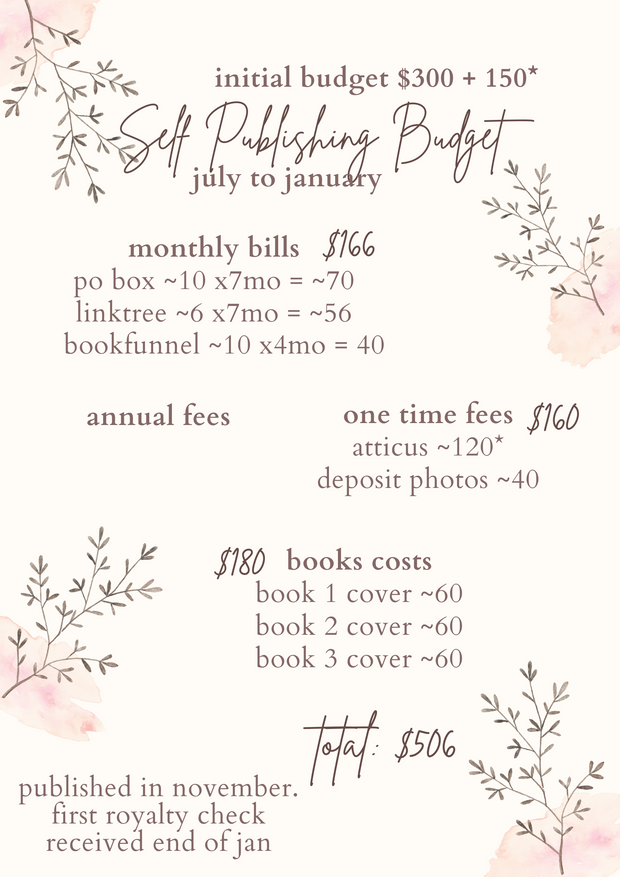
Here it is. I spent $506 from July through January, releasing my first book at the end of November, and receiving my first royalty check at the end of January.
This is how I started.
Let me tell you what I did right and what I did wrong, and what I would do if I had a little more money.
PO BOX: YES
In order to send out Newsletters, you have to have a mailing address listed within the Newsletter. This is not optional. Now, can you put you home address? Sure. But, I wasn’t going to.
USPS Post Office boxes were outside of my price range, but I managed to find a legal online mailbox. I would pick up my mail from my local Staples, if I had any, as that is where my box is located. It costs me $10 a month. I use IPostal1.
LINKTREE PRO: NO
I forked up. I thought I needed to pay for it. I was paying for it in lieu of having a website, which, hilariously, would have been cheaper. One year with the lowest rate on DreamHost on WordPress is $35. Meanwhile, I wasted money on a Pro account I didn’t even need. Big regrets there.
BOOKFUNNEL: YES BUT UPGRADE
This is one that I wish I had had more money for. A bookfunnel account is used to set out eBooks, particularly to ARC Readers. It’s $10 a month or $100 for the year for mid-tier, which is the tier that I recommend. I could not do what I needed to do with the First Time Author Tier. I am upgrading to an annual account this month.
Take the money you saved from not getting a Linktree Pro and just get a Bookfunnel Account lmao.
CANVA: NOT MENTIONED
I already have an annual subscription to Canva, which is why it’s not listed here, but I highly recommend getting a CanvaPro account. It’s how I make all of my graphics and stickers. There so many gorgeous fonts and video options. It’s $13 a month or $120 a year. I will be renewing this year and will be adding it to my budget for 2022.
ATTICUS: YES
Atticus is my formatting program. I managed to get onto the Beta testing, so I paid less for it. I believe it is now $140. I do not write in Atticus. I only format. I format both my eBook and my Paperback in Atticus. I love it. YOU DO NOT HAVE TO USE IT. You can use the free formatters on Draft2Digital or Reedsy, or you could go with Vellum if you have a Mac and Word if you have Microsoft Office. That stated, I do not regret this purchase at all.
( * The star denotes that I sold some things to be able to purchase Atticus additionally, because it was that important to me. )
Atticus Update January 2026 – Atticus now supports, promotes, and partners with cover designers who use Generative AI. All formers opinions of Atticus are now negated due to the simple fact that generative AI is stealing from artists and creators.
DEPOSIT PHOTOS: YES, IF
We will talk more about stock photos when we get to talking about Covers, however, if you happen to see AppSumo do their deal for $40 for 100 images on Deposit Photos, GRAB IT. That deal is rare, and it is worth it. That stated, if you’re paying thousands for a Cover, I imagine your Cover Artist isn’t a scam. But, still recommend having photos for other things.
COVER COSTS: No Regrets
I know you see $60 and go wow. I had my Covers made with an Artist on Fiverr. We will talk about this more when we get to the post about Covers. I do not regret how I went about this in the slightest, but because I could not put in money, I put in time.
THE GRAND TOTAL
Now, you will note that I spent more than I budgeted, but that is because I also sold Signed Copies of my book. I will be talking about how I did this in the future. Just know that, the extra money I made from selling signed copies, went into purchasing the third cover, which is where the extra $54 I was short came from.
So here it is. Transparency. I published my first book for less than $500, and I’m continuing my self publishing journey still on a careful budget. I’m still new to this, but it’s working for me.
Ready to get started?
Please Note: This post was originally published and share on Elle’s Authoring Chaos Patreon on 2 February 2022.